Types of APIs and Platform Deployment
In the omag-server-platform assembly, there is a jar file called egeria-platform-report.jar under the etc/reports directory. This contains a utility that reports on the status of a running OMAG Server Platform.
Run EgeriaPlatformReport
Select EgeriaPlatformReport and then Run 'EgeriaPlatformReport...main()' from the right-mouse menu.
A new Run tab appears next to EgeriaPlatform. EgeriaPlatformReport runs but fails:
/Library/Java/JavaVirtualMachines/temurin-17.jdk/Contents/Home/bin/java -Dfile.encoding=UTF-8 -jar /egeria-install/egeria-platform-5.0-distribution.tar.gz/assembly/etc/reports/egeria-platform-report.jar
===============================
OMAG Server Platform Report:    Mon Sep 04 18:00:51 BST 2023
===============================
Running against platform: https://localhost:7443
Using userId: garygeeke

Platform report for: https://localhost:7443
Platform deployment
There was an org.odpi.openmetadata.frameworks.connectors.ffdc.PropertyServerException exception when calling the platform.  Error message is: OMAG-COMMON-503-001 A client-side exception was received from API call getPlatformOrigin to OMAG Server EgeriaPlatform at https://localhost:7443.  The error message was CLIENT-SIDE-REST-API-CONNECTOR-503-002 A client-side exception org.springframework.web.client.ResourceAccessException was received by method getPlatformOrigin from API call https://localhost:7443/open-metadata/platform-services/users/{1}/server-platform/origin to server EgeriaPlatform on platform https://localhost:7443.  The error message was I/O error on GET request for "https://localhost:7443/open-metadata/platform-services/users/garygeeke/server-platform/origin": PKIX path building failed: sun.security.provider.certpath.SunCertPathBuilderException: unable to find valid certification path to requested target

Process finished with exit code 255
Set up VM Options

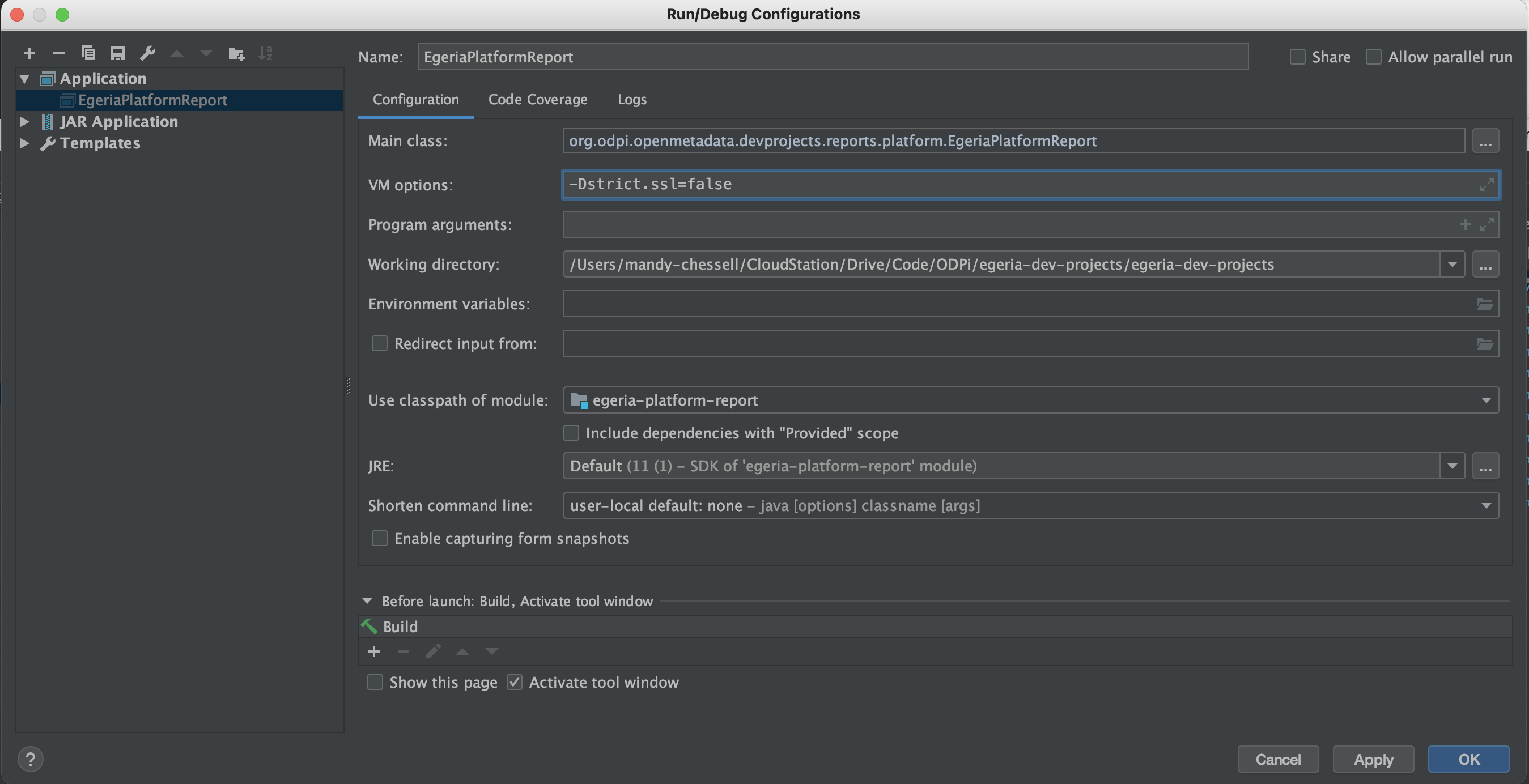
Click on the white down arrow of the configurations box and select Edit Configurations.... Select the configuration for EgeriaPlatformReport to show its configuration form.
Add -Dstrict.ssl=false to the VM Options and click OK to save the configuration. This turns off the need for a certificate.
Don't see VM Options in the configuration form?
You may need to use the Modify Options dropdown to Add VM Options to your configuration form.

Rerun EgeriaPlatformReport
Re-run EgeriaPlatformReport by clicking on the green arrow on the Run tab. There is more output this time even though it still seems to fail in the end. It begins with the report header that records the platform it is running against.
/Library/Java/JavaVirtualMachines/temurin-17.jdk/Contents/Home/bin/java -Dstrict.ssl=false -Dfile.encoding=UTF-8 -jar /Users/mandy-chessell/egeria-install/egeria-platform-5.0-distribution.tar.gz/assembly/etc/reports/egeria-platform-report.jar
===============================
OMAG Server Platform Report:    Mon Sep 04 19:38:03 BST 2023
===============================
Running against platform: https://localhost:7443
Using userId: garygeeke

Platform report for: https://localhost:7443
Then EgeriaPlatfromReport starts to call the Egeria APIs that are used for configuring and managing the OMAG Server Platform.
Platform deployment
  Egeria version: Egeria OMAG Server Platform (version 5.0)
  Configuration document store connector: <null>
  Platform security connector: <null>
The Egeria version is retrieved using the getPlatformOrigin method of the Platform Services.
1 2 3 | |
OMAGServerPlatformConfigurationClient
1 2 3 4 | |
Next is the list of Registered services. These are optional services that can be plugged into the OMAG Server Platform and provide the services to retrieve and maintain/govern open metadata. The list that you see is the default set of services installed with the platform.
List of registered services from EgeriaPlatformReport
   Registered services
      Data Manager OMAS: Capture changes to the data stores and data set managed by a data manager such as a database server, content manager or file system.
      Design Model OMAS: Exchange design model content with tools and standard packages
      Asset Manager OMAS: Manage metadata from a third party asset manager
      IT Infrastructure OMAS: Manage information about the deployed IT infrastructure
      Data Science OMAS: Create and manage data science definitions and models
      Community Profile OMAS: Define personal profile and collaborate
      Digital Architecture OMAS: Design of the digital services for an organization
      Asset Owner OMAS: Manage an asset
      Stewardship Action OMAS: Manage exceptions and actions from open governance
      Governance Program OMAS: Manage the governance program
      Digital Service OMAS: Manage a digital service through its lifecycle
      Asset Lineage OMAS: Store asset lineage
      Asset Consumer OMAS: Access assets through connectors
      DevOps OMAS: Manage a DevOps pipeline
      Software Developer OMAS: Interact with software development tools
      Project Management OMAS: Manage governance related projects
      Governance Server OMAS: Set up an operational governance engine
      Data Privacy OMAS: Manage governance of privacy
      Security Manager OMAS: Manages exchange of metadata with a security service
      Governance Action OMES: Executes requested governance action services to monitor, assess and maintain metadata and its real-world counterparts.
      Repository Governance OMES: Dynamically governance open metadata repositories in the connected cohorts.
      Survey Action OMES: Analyses the content of an asset's real world counterpart, generates annotations in an open discovery report that is attached to the asset in the open metadata repositories.
      Glossary Manager OMVS: Create glossary terms and organize them into categories as part of a controlled workflow process. It supports the editing glossary and multiple states.
      My Profile OMVS: Manage information about the logged on user as well as their preferences.
      Glossary Browser OMVS: View glossary terms and categories within a glossary.
The registered are also retrieved through the Platform Services using the getXXXServices method as follows:
1 2 3 | |
Observe no servers from EgeriaPlatformReport
Finally, EgeriaPlatformReport calls the Administration Services to request the list of configured servers. At this stage, there are none.
   Platform servers
      None

Process finished with exit code 0
EgeriaPlatformReport also creates a markdown document called egeria-platform-report.md that contains its output. This version of egeria-platform-report.md is included for your reference.