Running the Platform in IntelliJ
Creating a configuration for OMAG Server Platform
From your IntelliJ window, look for a box called Add Configuration...
 Or you may see a dropdown, in which case select "Edit Configurations ..."
Click on it and a wizard window opens. Open the list of Templates on the left hand column (you may need to click on the + sign in some versions of IntelliJ).
 Scroll down to Jar Application template and select it. A form appears on the right-hand side.
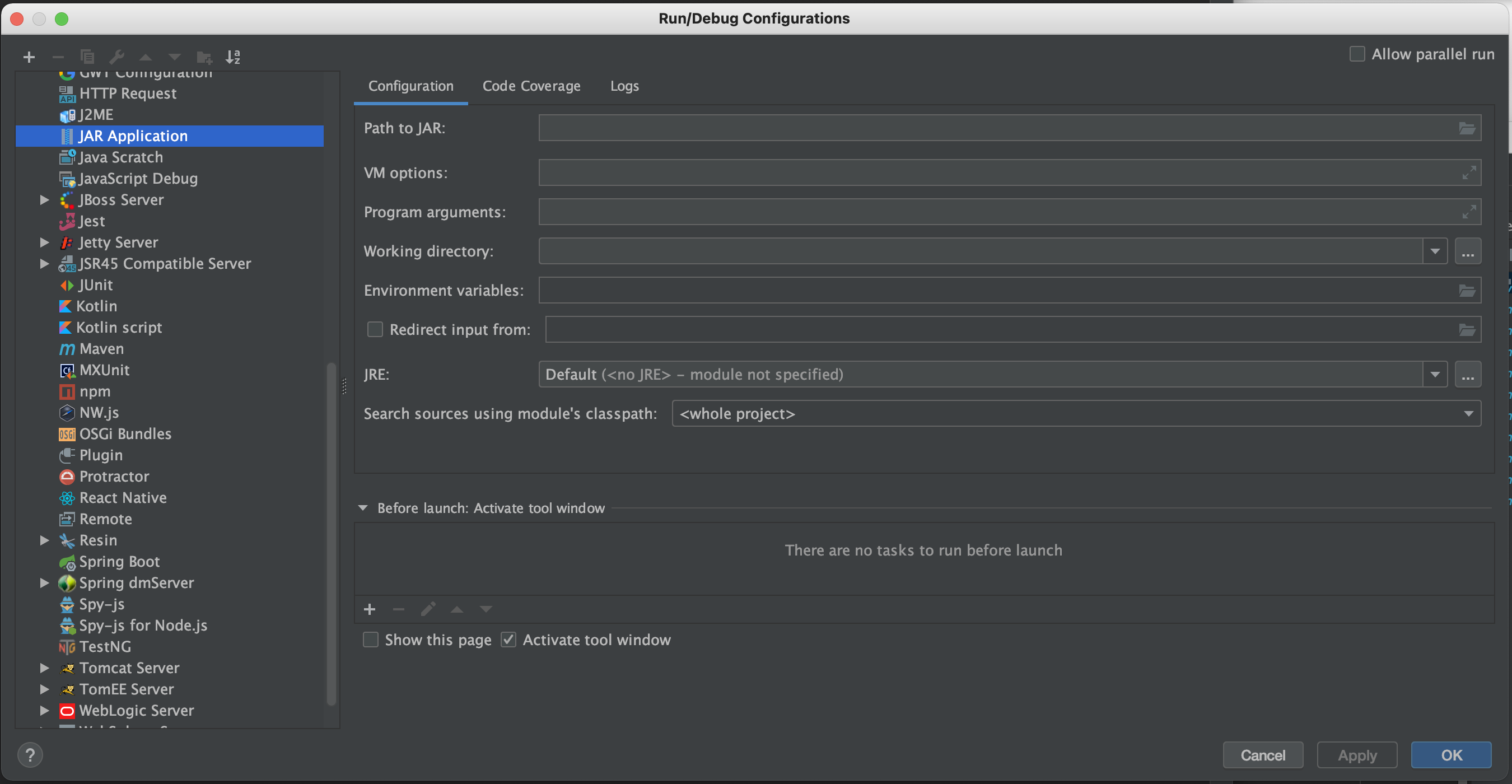 Enter:
EgeriaPlatformat the top underName:Path to Jaris set to the directory where the OMAG Server Platform jar is locatedVM Optionsis set to-Dstrict.ssl=false -Dloader.path=server/lib -Dserver.port=7443. This turns off SSL checking, points to thelibdirectory where you will be adding your new connector jar files and requests that the OMAG Server listens on port7443.Working Directoryis set to the parent directory above the directory with the OMAG Server Platform jar. This directory includes thetruststore.p12certificate file needed for the platform to start successfully.
The example below is from a machine where the directory used to install Egeria was /Users/mandy-chessell/egeria-install. Notice the directory name needs to be specified in full, - the ~ notation does not work here. In this example, the Egeria release used was 5.0.
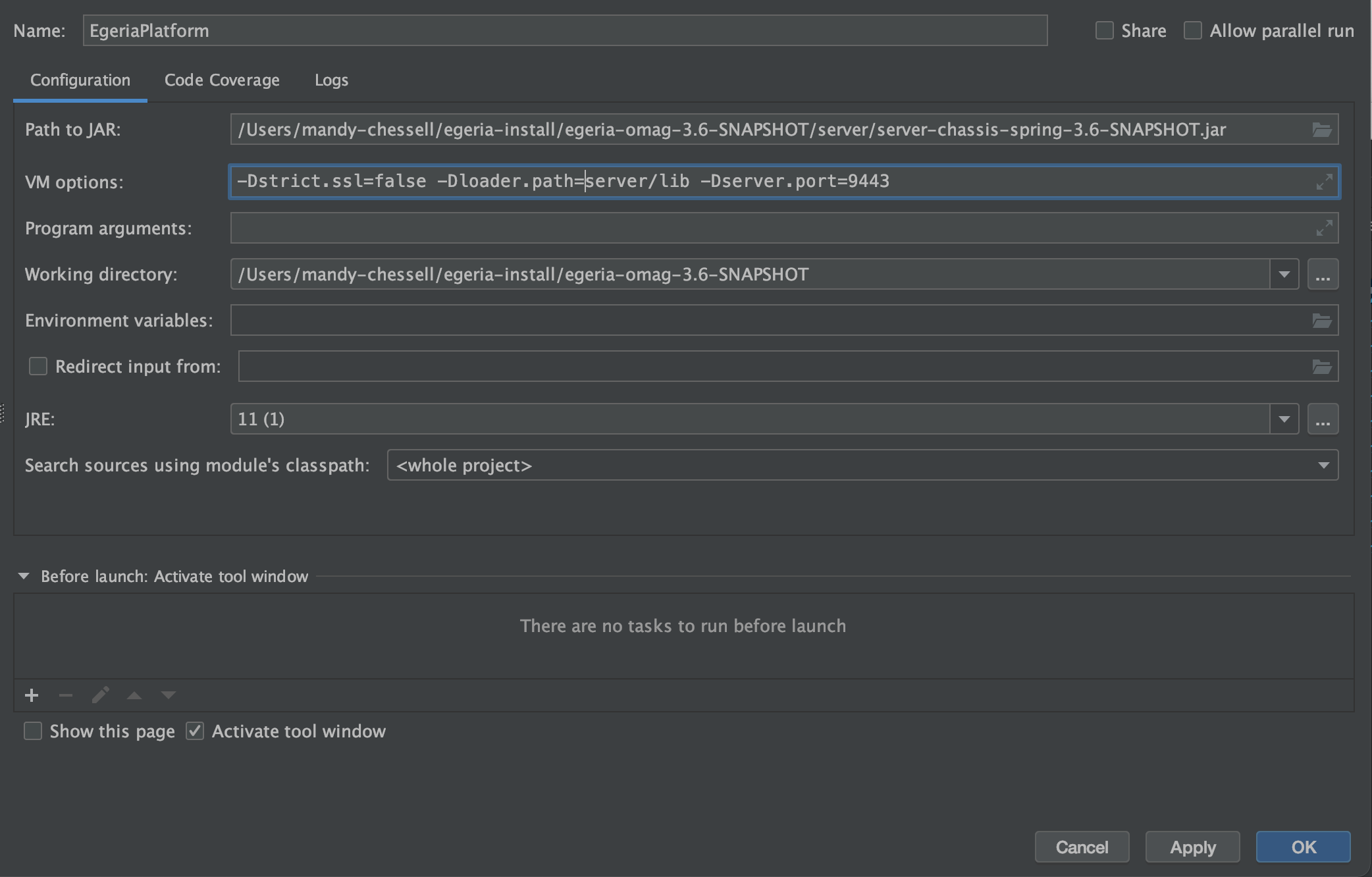
Once you have entered these values, click OK. The Add Configurations ... box has been replaced by a drop-down menu that includes your new configuration called EgeriaPlatform.

If you click on the down arrow next to EgeriaPlatform you will see Add Configurations ... has been replaced by Edit configurations.... You will use this option later to add configurations for other utilities as the dojo progresses.

With EgeriaPlatform showing in the configurations box, click the green triangle and a Run tab opens showing the platform is starting up. The first line of the output is the call used to start the platform. You should be able to see the options that you added to the EgeriaPlatform configuration. After the command is the console output of the OMAG Server Platform. When you see the OMAG server platform ready for more configuration message, it is ready for work.
/Library/Java/JavaVirtualMachines/temurin-17.jdk/Contents/Home/bin/java -DString.ssl=false -Dloader.path=lib,extra -Dserver.port=7443 -Dfile.encoding=UTF-8 -jar /egeria-install/egeria-platform-5.0-distribution.tar.gz/assembly/platform/omag-server-platform-4.3.jar
 Project Egeria - Open Metadata and Governance
    ____   __  ___ ___    ______   _____                                 ____   _         _     ___
   / __ \ /  |/  //   |  / ____/  / ___/ ___   ____ _   __ ___   ____   / _  \ / / __    / /  / _ /__   ____ _  _
  / / / // /|_/ // /| | / / __    \__ \ / _ \ / __/| | / // _ \ / __/  / /_/ // //   |  / _\ / /_ /  | /  _// || |
 / /_/ // /  / // ___ |/ /_/ /   ___/ //  __// /   | |/ //  __// /    /  __ // // /  \ / /_ /  _// / // /  / / / /
 \____//_/  /_//_/  |_|\____/   /____/ \___//_/    |___/ \___//_/    /_/    /_/ \__/\//___//_/   \__//_/  /_/ /_/

 :: Powered by Spring Boot (v3.1.1) ::

2023-09-04T15:46:39.390+01:00  INFO 76773 --- [           main] o.o.o.s.springboot.OMAGServerPlatform    : Starting OMAGServerPlatform using Java 17.0.6 with PID 76773 (/egeria-install/egeria-platform-5.0-distribution.tar.gz/assembly/platform/omag-server-platform-5.0.jar started by mandy-chessell in /egeria-install/egeria-platform-5.0-distribution.tar.gz/assembly/platform)
2023-09-04T15:46:39.392+01:00  INFO 76773 --- [           main] o.o.o.s.springboot.OMAGServerPlatform    : No active profile set, falling back to 1 default profile: "default"
2023-09-04T15:46:43.116+01:00  INFO 76773 --- [           main] o.s.b.w.embedded.tomcat.TomcatWebServer  : Tomcat initialized with port(s): 7443 (https)
2023-09-04T15:46:44.443+01:00  INFO 76773 --- [           main] o.o.o.s.springboot.OMAGServerPlatform    : Working directory is: /egeria-install/egeria-platform-5.0-distribution.tar.gz/assembly/platform
2023-09-04T15:46:44.443+01:00  WARN 76773 --- [           main] o.o.o.s.springboot.OMAGServerPlatform    : Java trust store 'javax.net.ssl.trustStore' is null - this is needed by Tomcat - using 'server.ssl.trust-store'
2023-09-04T15:46:46.591+01:00  INFO 76773 --- [           main] o.s.b.w.embedded.tomcat.TomcatWebServer  : Tomcat started on port(s): 7443 (https) with context path ''
2023-09-04T15:46:46.608+01:00  INFO 76773 --- [           main] o.o.o.s.springboot.OMAGServerPlatform    : Started OMAGServerPlatform in 7.925 seconds (process running for 8.73)
Mon Sep 04 15:46:46 BST 2023 No OMAG servers listed in startup configuration
Mon Sep 04 15:46:46 BST 2023 OMAG server platform ready for more configuration
The Run tab where the OMAG Server Platform is running includes a control panel that allows you to start, restart, stop and control the scrolling of output of the program that is running. If you hover your mouse over the controls, the hover-text indicates what it does.
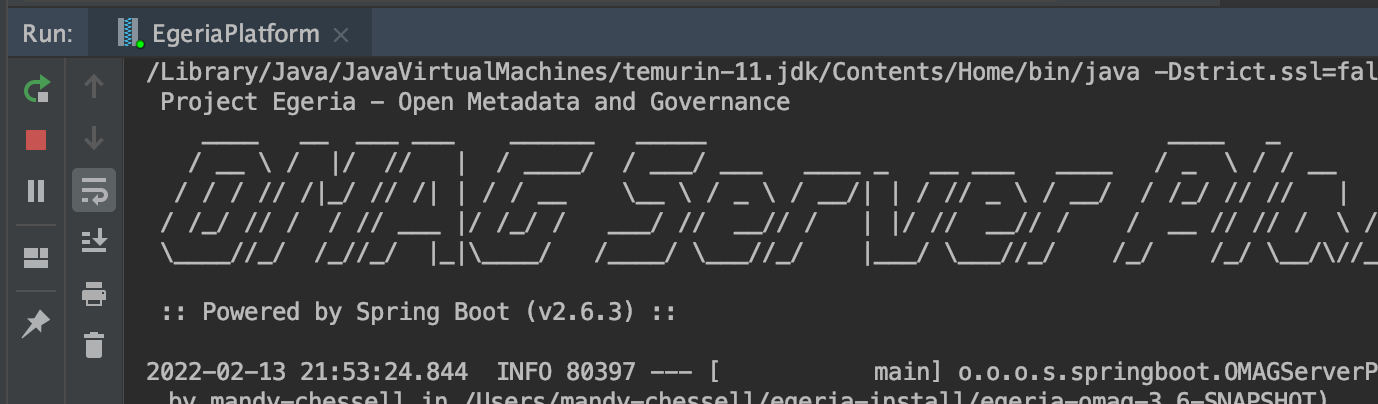
Feel free to experiment with the controls - but be sure that the OMAG Server Platform is running when you finish as it is needed for the next step.